
APPSC Assistant Professor Hall Ticket 2026 Out, Download Now
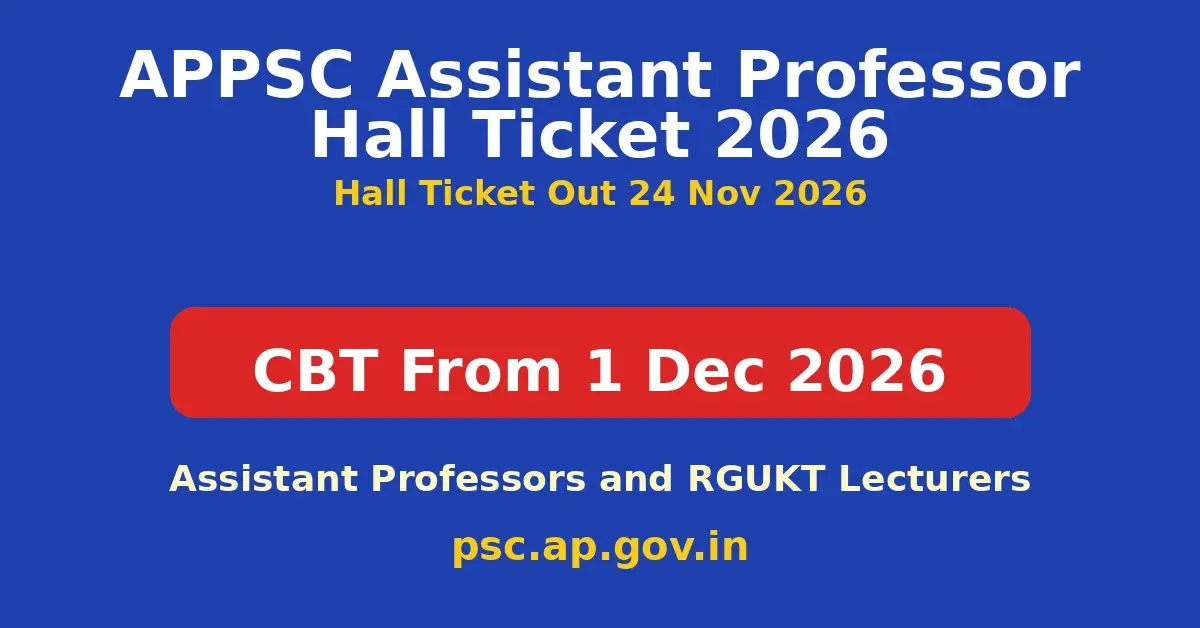
The APPSC Assistant Professor Hall Ticket 2026 is out now, and the Andhra Pradesh Public Service Commission put the hall tickets on its official website on 24 November 2026 for downloading. Candidates can download the hall ticket from psc.ap.gov.in through the Download Hallticket link.
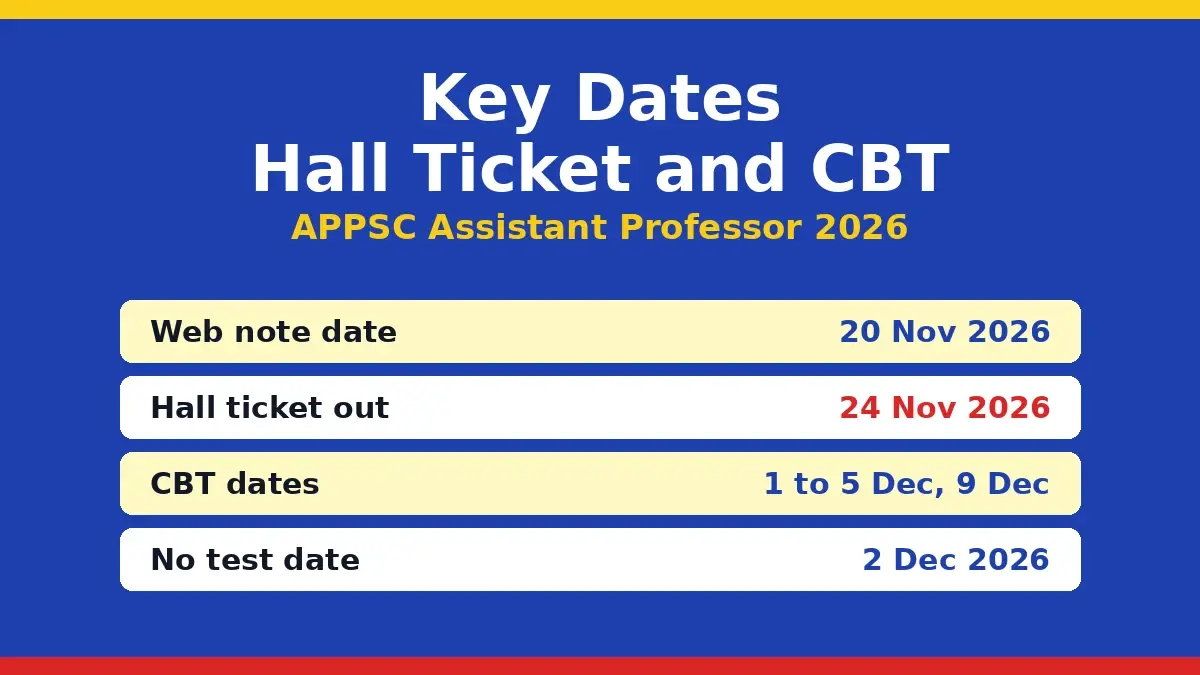
The computer based test will run from 1 December 2026 to 5 December 2026 and again on 9 December 2026. The test will cover the posts of Assistant Professors in Various Universities and Lecturers in RGUKT for 2026.
Your own exam date will come on your hall ticket. Your session and your exam centre will also come on your hall ticket, so download the ticket first and read it with full care before you plan anything else for the exam days.
This page gives the full hall ticket update in simple words. You will find the download steps, the login details, the test dates, the session timings and the checks to run after the download. Every date and every time on this page comes from the official web note of the Commission named in the Sources part at the end.
Listen to this article in 1 minute:
Is the APPSC Assistant Professor Hall Ticket 2026 out now?
Yes, the hall tickets came out on 24 November 2026. The Commission put the hall tickets on the official website psc.ap.gov.in on that date, and candidates can download them from the website.
The Commission gave this news in a web note dated 20 November 2026. The web note came from Vijayawada, and the Commission put the web note on the announcements part of psc.ap.gov.in on 20 November 2026.
Read the two dates with care. The web note date is 20 November 2026, and the hall ticket hosting date is 24 November 2026. The web note told candidates in advance that the hall tickets would come on the website on 24 November 2026.
| Point | Detail |
|---|---|
| Conducting body | Andhra Pradesh Public Service Commission (APPSC) |
| Posts | Assistant Professors in Various Universities and Lecturers in RGUKT 2026 |
| Web note date | 20 November 2026 |
| Web note place | Vijayawada |
| Hall tickets on the website from | 24 November 2026 |
| Official website | psc.ap.gov.in |
| Download page | portal-psc.ap.gov.in/Download_HallTickets |
Candidates who open the website today will find the hall tickets ready for downloading. A candidate who waits for a letter at home will wait in vain, because the Commission gives the hall ticket through the website download route named in the web note.
Download your hall ticket today itself. An early download gives you time to read your exam date, check your centre and plan your travel in a calm way, while a download on the last evening leaves no room for a slow website or a printer problem at the wrong hour.
The gap between the hall ticket date and the first test date is short. The hall tickets came on 24 November 2026, and the test starts on 1 December 2026. Count the days and you will see one clear week for download, reading and travel planning.
Which posts does this hall ticket cover?
The hall ticket covers two post groups. The first group is Assistant Professors in Various Universities. The second group is Lecturers in RGUKT.
The full post name in the web note reads Assistant Professors in Various Universities and Lecturers in RGUKT 2026. Keep this full name in your notes. It helps you match the right web note when the announcements page shows many notices in one list.
| Post group | Name in the web note |
|---|---|
| Post group 1 | Assistant Professors in Various Universities |
| Post group 2 | Lecturers in RGUKT |
| Recruitment year in the name | 2026 |
| Conducting body | Andhra Pradesh Public Service Commission (APPSC) |
A candidate from either post group uses the same download route. The web note gives one download link for the hall tickets of this recruitment, and the login page asks for the OTPR ID, the password and the captcha.
Check the post name on your hall ticket after the download. Your hall ticket should match the post you applied for, and a mismatch needs quick attention through the Commission before your exam day arrives.
The web note gives no post count. This page also gives no post count, because a number without a source helps no candidate and a wrong number can mislead many readers in one day.
Candidates often ask about subject wise dates at this stage. The web note gives no subject wise date table. Your hall ticket gives your own exam date, and that date is the only date you should trust for your own paper.
How can you download your hall ticket step by step?
Open the official website first. Go to psc.ap.gov.in in your browser and look for the Download Hallticket link on the website.
Click the Download Hallticket link. The link takes you to the download page at portal-psc.ap.gov.in/Download_HallTickets, and the page asks you to log in before the hall ticket opens on your screen.
| Step | What to do |
|---|---|
| Step 1 | Open the official website psc.ap.gov.in |
| Step 2 | Find the Download Hallticket link on the website |
| Step 3 | Click the link and reach portal-psc.ap.gov.in/Download_HallTickets |
| Step 4 | Enter your OTPR ID in the login box |
| Step 5 | Enter your password in the login box |
| Step 6 | Enter the captcha shown on the page |
| Step 7 | Submit the login and open your hall ticket |
| Step 8 | Download the hall ticket file and save it safely |
| Step 9 | Print the hall ticket on clean paper |
Keep your OTPR ID ready before you open the page. Keep your password ready as well. A login page can time out while you search for a number in old messages, and a fresh login attempt costs you time on a busy day.
Type each detail with care. One wrong letter in the password can block the login. One wrong digit in the OTPR ID can block the login too, and the page will show an error that looks like a website fault at first sight.
Read the captcha slowly. Captcha letters can look close to each other on a small phone screen, and a computer screen shows the captcha in a bigger and clearer size for many candidates.
Save the downloaded file with a clear name. A name with your own name and the exam name helps you find the file fast on a busy morning. Keep one copy on your phone and one copy on a computer if you have both devices at hand.
Print the hall ticket after the download. A print on clean white paper reads well at the centre gate. A faint print can hide a centre address line, and a cut print can hide the session timing that you need most.
Print two copies. Keep one copy in your exam bag. Keep the second copy at home with a family member, so a lost bag or a wet print on the way to the centre does not end your exam day before it starts.
Use the official route only. The web note names the official website and the official download page, and no other page can give you a true hall ticket for this recruitment. A page that asks for money for a hall ticket download deserves no trust at all.
A candidate who downloads the hall ticket on a shared computer should take one extra care step after the print comes out, because the downloaded file can stay in the download folder of that computer for the next user to open. Save the file to your own phone or your own storage, print the copies you need, and then remove the file from the shared computer before you leave the shop or the library desk. The same care suits a cyber cafe visit, where many candidates use one machine in one day and a hall ticket file with your name and centre details should travel home with you alone.
What login details will the download page ask for?
The download page asks for three details. The first detail is your OTPR ID. The second detail is your password. The third detail is the captcha shown on the page.
| Login detail | What to enter |
|---|---|
| OTPR ID | Your own OTPR ID from your application record |
| Password | Your own password for the portal login |
| Captcha | The letters or numbers shown on the login page |
Your OTPR ID ties your login to your own application record. Enter your own OTPR ID only. A friend OTPR ID will open a friend hall ticket, and a hall ticket with another name will not help you at your centre gate.
Your password protects your login. Type the password yourself. Do not share your password with any person who offers to download the hall ticket for you, because the download takes a few minutes and the official page charges no fee for the download.
The captcha checks that a human runs the login. Enter the captcha as the page shows it. A wrong captcha entry sends you back to the login box, and a fresh captcha will appear for the next try.
A failed login needs a calm check. Read your OTPR ID once more. Read your password once more, letter by letter, and then enter the fresh captcha with care before you press the submit button again.
Caps lock can spoil a password entry. A password with a capital letter needs the same capital letter at login time. Check the caps lock key on your keyboard when a correct looking password fails again and again.
A slow page needs patience. Many candidates open the download page in the same hour on the first day, and the page can load slowly under that load. Wait a few minutes and try again in a quiet hour, such as early morning or late evening.
On which dates will the CBT run?
The computer based test will run from 1 December 2026 in the Fore Noon and After Noon sessions to 5 December 2026 in the Fore Noon session. The test will run again on 9 December 2026 in the Fore Noon and After Noon sessions.
One date in the first stretch carries no test. The schedule excepts 2 December 2026. Read that exception with care, because a candidate who marks every date from 1 December to 5 December as a test date will mark one wrong date in the diary.
| Test date | Session |
|---|---|
| 1 December 2026 | Fore Noon and After Noon |
| 2 December 2026 | No test on this date |
| 3 December 2026 | Fore Noon and After Noon |
| 4 December 2026 | Fore Noon and After Noon |
| 5 December 2026 | Fore Noon |
| 9 December 2026 | Fore Noon and After Noon |
 The test centres sit in the erstwhile 13 district centres. The web note gives the centre spread in those words. Your hall ticket gives your own centre, and your centre can fall in any one of those district centres.
A date range can mislead a hurried reader. The range tells you the full test window for the whole recruitment. The range gives no single date for your own paper, and your own date will come from your hall ticket alone.
Mark the full window in your diary for now. Then mark your own date in a bigger way after the download. The big mark should match the date printed on your hall ticket, word for word and number for number.
A clash with another exam needs the same care. Compare exam dates from hall tickets only. A date range from a news page cannot settle a clash, while two hall tickets with two printed dates settle the question in one look.
Candidates with a test date on 1 December 2026 have the least time. Download the hall ticket today, read the centre address today and plan the travel today. A candidate with a test date on 9 December 2026 holds more days, and those extra days suit revision and a calm travel plan.
The gap after 5 December 2026 needs a clear reading. The schedule names no test date on 6 December, 7 December or 8 December 2026. The next test date after 5 December 2026 is 9 December 2026, with both sessions on that date.
What are the Fore Noon and After Noon session timings?
The Fore Noon session runs from 9.30 AM to 12.30 PM. The After Noon session runs from 3.00 PM to 6.00 PM. Each session gives three hours on the clock.
| Session | Timing |
|---|---|
| Fore Noon | 9.30 AM to 12.30 PM |
| After Noon | 3.00 PM to 6.00 PM |
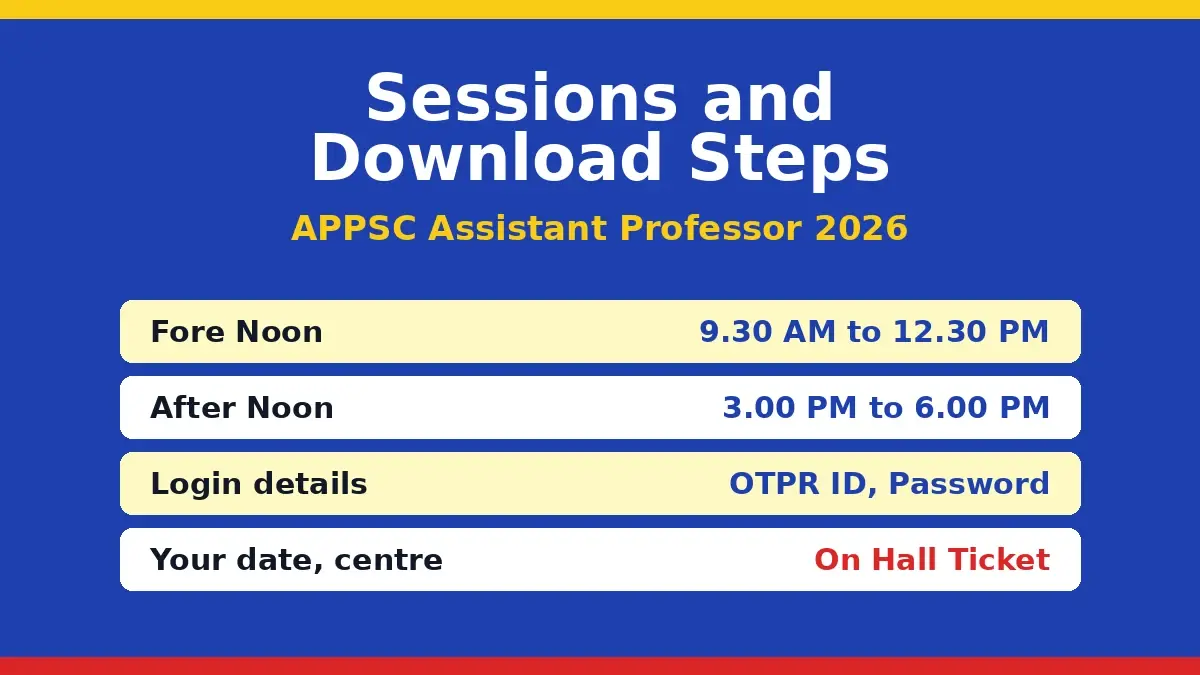 Fore Noon means the morning session. After Noon means the afternoon session. The web note uses the short forms FN and AN for the two sessions, and your hall ticket will show your session for your own paper.
A morning session candidate should plan an early start. A centre in another town needs an early bus or train, and a late start can turn a calm morning into a rush at the centre gate.
An afternoon session candidate holds the morning hours in hand. Use those hours for a light revision and a calm travel plan. A heavy study session right before the paper can tire the mind before the first question appears on the screen.
Check your session on your hall ticket. A candidate who reaches the centre for the morning session with an afternoon hall ticket will face a long wait, and a candidate who reaches in the afternoon with a morning hall ticket will miss the paper.
Session timings give the paper window. Your hall ticket and the instructions on it govern your reporting and entry at your centre, so read every instruction line on your hall ticket and follow the hall ticket over any general advice on any page.
Plan your food and rest around your session. A morning candidate needs a good sleep on the night before the paper. An afternoon candidate needs a light meal before the paper, so hunger and sleepiness stay away from the exam hall.
How will you know your own exam date and centre?
Your hall ticket tells you your own exam date. Your hall ticket tells you your session. Your hall ticket tells you your exam centre.
| Detail | Where you will find it |
|---|---|
| Your exam date | Your hall ticket |
| Your session | Your hall ticket |
| Your exam centre | Your hall ticket |
| Full test window | Official web note dated 20 November 2026 |
| Session timings | Official web note dated 20 November 2026 |
The web note gives the full test window for the recruitment. The hall ticket gives the personal slice of that window for one candidate. Both papers matter, and the hall ticket slice matters most for your own travel and your own morning plan.
Do not copy a date from a friend. Two candidates in the same recruitment can hold two different test dates. A friend date can fall on 1 December 2026 while your date falls on 9 December 2026, and a copied date will send you to a centre on a wrong day.
Do not copy a centre from a friend either. Centres spread across the erstwhile 13 district centres, and your centre will match your own hall ticket. Read your centre name and address from your own print, line by line.
A centre address needs a map check on the download day itself. Open the address on a map. Note the route, the travel time and a landmark near the centre, so the exam morning holds no search for a road at the last minute.
Two centres can carry close names in one town. Your hall ticket address settles the doubt. Trust the full address on your print over a short name heard from another candidate in a bus or a hostel corridor.
Keep your hall ticket print safe after the reading. A folded print can tear at a fold line. A flat print in a clear folder keeps every line readable at the gate and inside the exam hall.
What should you check on your hall ticket after download?
Read your name first. Check the spelling of your name on the hall ticket. A spelling gap between your hall ticket and your identity proof can slow your entry at the centre gate.
Read your exam date next. Read your session after the date. Read your centre name and the full centre address after the session, and read each line slowly, because one missed line can hide the detail you need most.
| Check | Why it matters |
|---|---|
| Your name | The spelling should match your application record |
| Your exam date | The date fixes your travel day |
| Your session | The session fixes your start time |
| Your centre name | The name fixes your destination |
| Your centre address | The address fixes your route |
| Post name on the ticket | The post should match your application |
Check your photograph on the print. A clear photograph helps the centre staff match your face with your ticket. A faint print can blur the photograph, and a fresh print from the saved file fixes a faint copy in one minute.
Check the post name on your ticket. The ticket covers Assistant Professors in Various Universities and Lecturers in RGUKT 2026. Your ticket should carry the post group from your application.
Read every instruction line on the ticket. Instructions can cover entry, conduct inside the hall and the close of the paper. A candidate who reads the instructions at home reaches the centre with a clear mind.
A wrong detail needs quick action. Contact the Commission through the official website routes at once. A detail fixed on the download day costs a short effort, while the same detail found at the centre gate can cost the whole paper.
Do not correct a hall ticket by hand. A hand correction on a print carries no value at a centre gate. A true correction comes from the Commission through its own process.
Take a second print after every check. Keep the second print in your bag. A spare print saves the day when the first print tears, gets wet or stays behind in a room far from the centre.
Save the file on your phone as well. A phone copy works as a backup record of your date and centre. The print in your hand remains the paper you carry to the centre, so guard the print with care.
What should you do if the download does not work?
Stay calm. A failed download on the first try happens to many candidates. The login page can slow down when a large number of candidates open the same page in the same hour.
Check your OTPR ID once more. One wrong digit can stop the login. Type the OTPR ID slowly and read it back before you press the submit button.
Check your password once more. A password can fail for a small reason, such as a capital letter typed in a small form. Read the password letter by letter and watch the caps lock key on your keyboard.
Enter a fresh captcha. The page shows a new captcha after a failed try. A captcha from the old try will fail again, so read the new captcha on the screen and type the new letters.
Try a quiet hour. Early morning and late evening hours often load faster. A page that fails at noon can open in a minute at night, and the hall ticket will wait for you on the official page.
Try a computer if the phone fails. A bigger screen shows the login boxes and the captcha in a clearer way. A computer also prints the hall ticket in a cleaner size for the centre gate.
Check your internet connection. A weak signal can stop a download in the middle. A half saved file can print as a blank page, so download the file again on a stable connection and print the fresh file.
Clear a stuck page with a fresh start. Close the browser tab. Open the official website again and follow the Download Hallticket link once more from the start.
Keep your login details private during every try. No person needs your password for a hall ticket download. A person who asks for your password or money for the download stands outside the official route named in the web note.
A login problem that lasts needs the Commission. Use the contact routes on the official website psc.ap.gov.in. Keep your OTPR ID and your application details ready when you raise the problem, so the Commission can trace your record fast.
What does the official web note not tell you?
The web note gives the hall ticket date, the download route, the test dates, the session timings and the centre spread. The web note gives no subject wise date table.
The web note gives no post count. The web note gives no fee detail. The web note gives no eligibility detail. This page repeats that limit in plain words, because a page that fills gaps with guesses can mislead a candidate on a costly day.
| Point | Position in the web note |
|---|---|
| Hall ticket date | Given, 24 November 2026 |
| Download route | Given, official website and download page |
| Test dates | Given, 1 December to 5 December 2026 and 9 December 2026 |
| Session timings | Given, Fore Noon and After Noon timings |
| Centre spread | Given, erstwhile 13 district centres |
| Subject wise dates | Not given in the web note |
| Post count | Not given in the web note |
| Your own date and centre | Given on your hall ticket |
A missing detail in the web note needs a check on your hall ticket or the official website. Your hall ticket carries your date, your session and your centre. The official website carries the web note and the download link.
Candidates should treat a subject wise date chart from an unknown page with care. The web note gives no such chart. Your hall ticket date remains the true date for your paper.
A fee claim or an eligibility claim needs an official source. This page makes no such claim. A candidate who needs those details should read the official recruitment records on the Commission website.
The limit of the web note protects candidates in one clear way. Every candidate reads the same dates and the same timings from one official paper. Your personal date then comes from your personal hall ticket, with no room for a copied date from a crowd.
How should you plan travel for your exam day?
Plan travel after the download. Your hall ticket gives your date, your session and your centre. A travel plan made before the download can waste money on a wrong town or a wrong day.
Check the distance to your centre. A centre in your own town needs a short plan. A centre in another district needs a bus or train plan with a time buffer for road delays and a slow morning.
Reach the centre area early. An early arrival gives you time to find the gate, drink water and settle your mind. A late arrival adds stress before the first question and can risk your entry.
A visit to the centre a day early helps many candidates. The visit shows the route, the gate and the time the road takes. A candidate with a centre in a far town can use the visit day to fix a stay near the centre.
Pack your bag on the night before the paper. Keep your hall ticket print in the bag. Keep a second print in the bag as well, and keep your identity proof with the prints in one clear folder.
Sleep early.
A full sleep keeps the mind fresh for a three hour session. A late night with fresh facts can leave the mind slow at the very hour the paper needs speed.
Eat a light meal before the paper. A heavy meal can bring sleepiness in a warm exam hall. Water in a small bottle, as your centre rules allow, can help during a long session.
Keep a phone plan for the centre gate. Many centres restrict phones inside the hall. Read the instructions on your hall ticket and follow the centre rules for phones and bags on your exam day.
A family member can hold a spare print at home. A spare print at home helps when a bag goes missing on the road. A phone copy of the hall ticket file also helps a family member print a fresh copy in a hurry.
How can mock test practice help in the last days?
The days between the hall ticket and your paper suit revision. A short daily plan beats a long plan that you drop in two days. Split your revision by topic and keep each study block short and clear.
A timed mock test trains your clock sense. The paper runs for three hours in one session. A mock test in one sitting shows your speed, your weak topics and your careless mistakes in one clear report.
Read your mock test result with care. Note the questions that went wrong. Note the topics behind those questions, and revise those topics first in the next study block.
Accuracy matters in every test. A careful attempt on a known question gains a mark. A wild guess can cost time and can shake your confidence in the middle of the paper.
Rest on the last day. Pack your bag. Sleep early. A calm last day with a printed hall ticket and a clear travel plan serves you better than a night of fresh facts that a tired mind cannot hold.
Candidates who prepare for Andhra Pradesh exams can use the Andhra Pradesh mock test page for practice. The page covers Andhra Pradesh exam practice in one place for state exam candidates.
Mock test practice works best with a review habit. Give one test. Read the result with care.
Fix one weak topic. A small fix after each test builds a strong score across the last days before your paper.
A candidate with a paper on 1 December 2026 holds a short revision window, so one full mock test with a deep review will serve that candidate better than three quick tests with no review at all. A candidate with a paper on 9 December 2026 holds a longer window, and that candidate can spread tests across the extra days with a full review after each test. Match the test plan to your own hall ticket date. A plan that fits your date will calm your mind, while a copied plan from a friend with a different date can rush your revision or waste your best days.
Which other pages should Andhra Pradesh candidates read?
Andhra Pradesh candidates often track more than one exam at a time. The Andhra Pradesh mock test page gives state exam practice in one place. Keep the page in your bookmarks for daily practice.
Candidates who follow admit card updates in other states can read the OPSC AEE admit card page. The page covers an Odisha engineering exam card and shows the admit card checks in a clear table.
Central exam candidates can read the SSC CPO admit card page. The page covers a central police exam card. A candidate with two exam applications should compare dates from hall tickets only.
Read other pages for practice and general checks. Read your own hall ticket for your own date, session and centre. No other page can replace your hall ticket print on your exam day.
Sources
Andhra Pradesh Public Service Commission official website: psc.ap.gov.in
Andhra Pradesh Public Service Commission web note on hall tickets for Assistant Professors in Various Universities and Lecturers in RGUKT 2026, dated 20 November 2026: official web note
Andhra Pradesh Public Service Commission hall ticket download page: portal-psc.ap.gov.in/Download_HallTickets