





⚡ Quick Summary: Online Typing Test & Government Exam Standards 2026
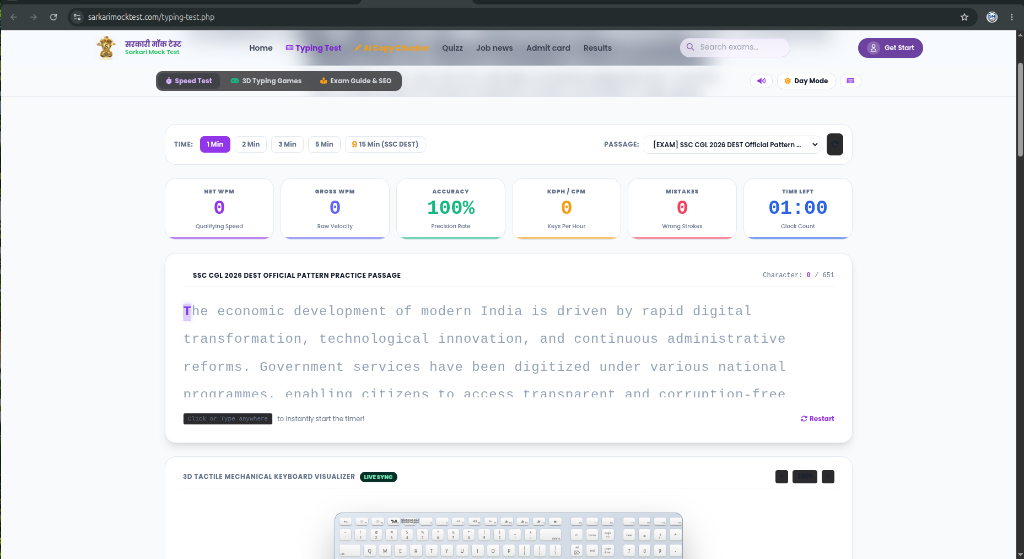
Sarkari Mock Test Online Typing Test Engine is a high-precision, real-time typing speed and accuracy testing platform designed specifically for government job aspirants (SSC CGL, CHSL, RRB NTPC, High Court, Police, Banking) and professional typists. Featuring a 3D interactive virtual keyboard, custom passage library, and 3D typing games, it calculates Gross WPM, Net WPM, Keystrokes Per Hour (KPH), and accuracy according to official examination formulas.
1. Official Government Exam Typing Speed Requirements (2026)
Different public service commissions in India mandate specific typing qualifications during skill tests and Data Entry Skill Tests (DEST). Here is the consolidated benchmark table:
| Recruitment Exam | Minimum Speed | Keystrokes (KDPH) | Permissible Error | Test Duration |
|---|---|---|---|---|
| SSC CGL DEST | 27 WPM (English) | 2,000 Key Depressions | 5% to 7% | 15 Minutes |
| SSC CHSL (LDC / JSA) | 35 WPM (Eng) / 30 WPM (Hin) | 10,500 / 9,000 KDPH | 5% to 7% | 10 Minutes |
| SSC CHSL (DEO Grade A) | 50 WPM (English) | 15,000 KDPH | 5% | 15 Minutes |
| RRB NTPC (Clerk / Typist) | 30 WPM (Eng) / 25 WPM (Hin) | 1,500 Words Equivalent | 5% Max Penalty | 10 Minutes |
| High Court Junior Clerk | 40 WPM (English) | 12,000 KDPH | 3% to 5% | 10 Minutes |
| CRPF / CISF Head Constable | 35 WPM (Eng) / 30 WPM (Hin) | 10,500 KDPH | 5% Mistakes Only | 10 Minutes |
2. How Typing Speed (Gross WPM vs Net WPM) is Calculated
In standard examination metrics, one "word" is standardized as 5 keystrokes (including characters, spaces, and punctuation). The official formulas used by examination boards are:
Gross Words Per Minute (GWPM)
Gross WPM measures raw typing speed without accounting for mistakes:
Net Words Per Minute (NWPM)
Net WPM is the qualifying speed after subtracting error penalties:
The Critical SSC Penalty Rule
In exams like SSC and RRB, full mistakes (omission of words, substitution of wrong words, addition of extra words) and half mistakes (spelling errors, improper capitalization, punctuation errors) deduct marks directly from your net score. Maintaining 95%+ accuracy is far more critical than blindly typing at high raw speed.
3. Touch Typing Technique: Master The Home Row
Touch typing is the method of using all ten fingers instinctively without looking down at the keyboard. Key points to master:
- Home Row Foundation: Position your left hand on
A, S, D, Fand your right hand onJ, K, L, ;. - F and J Tactile Ridges: Use the raised plastic bumps on the F and J keys to calibrate your index fingers without looking.
- Thumb on Spacebar: Rest both thumbs on the spacebar and use your dominant thumb to strike spaces rhythmically.
- Look Ahead Principle: Always train your eyes to scan 2 to 3 words ahead of the word your fingers are currently typing.
- Proper Ergonomics: Keep your back straight, feet flat on the floor, and elbows at an 85 to 90 degree angle.
4. 3D Interactive Virtual Keyboard Benefits
Our proprietary 3D Interactive Virtual Keyboard provides immediate visual feedback. Every time you press a physical key on your keyboard, the corresponding 3D key button depresses on screen with depth shadows, color illumination, and tactile click sounds. This builds neurological muscle memory 40% faster by reinforcing finger-to-key associations.